
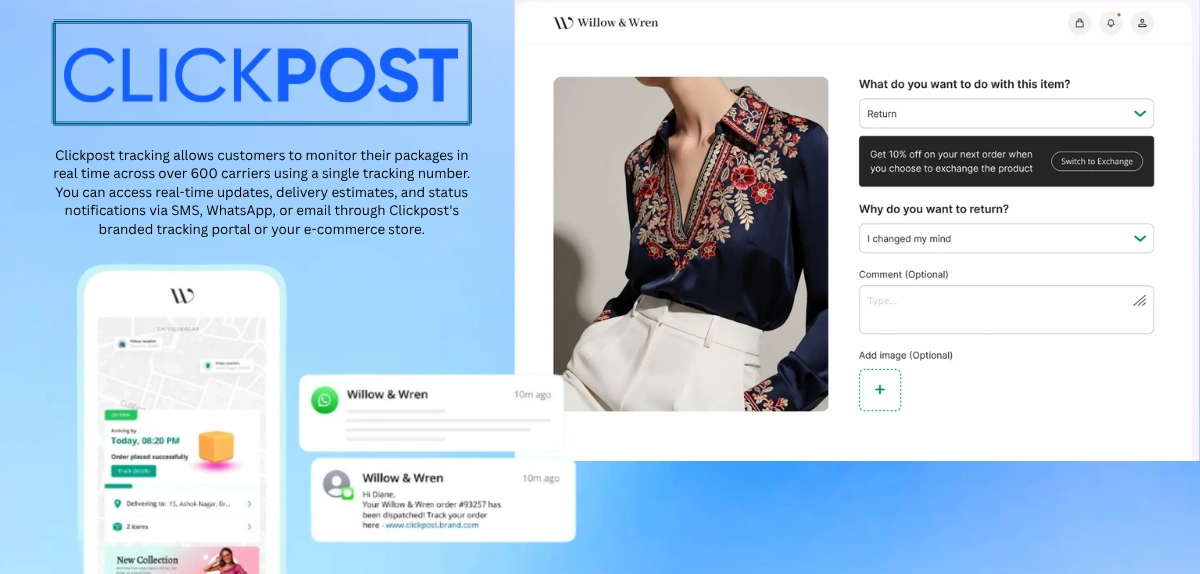
Direct Answer: Clickpost tracking allows customers to monitor their packages in real time across over 600 carriers using a single tracking number. You can access real-time updates, delivery estimates, and status notifications via SMS, WhatsApp, or email through Clickpost’s branded tracking portal or your e-commerce store.
Disclaimer: This article is based on publicly available information from Clickpost’s official website and general e-commerce logistics practices. Specific features, integrations, and availability may vary by region, retailer, or carrier. For the most current information, visit clickpost.ai or contact your retailer’s support team. Clickpost is a trademark of Felurian Technology Private Limited. All company and product names mentioned are trademarks of their respective owners.
Quick Facts About Clickpost Tracking
| Fact | Details |
|---|---|
| Integrated Carriers | 600+ carriers across 30+ countries |
| Tracking Availability | Real-time updates for all integrated couriers |
| Notification Channels | SMS, WhatsApp, Email, and in-app notifications |
| Estimated Delivery | Accuracy based on pincode, carrier, and order type |
| Dashboard Access | Available through web portal and mobile app |
| Support Hours | Contact support via portal; response times vary |
What Is Clickpost Tracking?
Clickpost is a logistics automation platform for e-commerce brands, but it also serves customers directly through a branded tracking experience.
Clickpost tracking does three main things:
1. Consolidates Information From Multiple Carriers
Instead of logging into Delhivery’s app, then Blue Dart’s, then FedEx’s, you see all your shipments in one place. This is especially useful if you order from multiple brands that use different couriers.
2. Provides Real-Time Status Updates
Clickpost pulls live data from carrier networks every few hours (sometimes more frequently). You don’t have to wait for delayed email updates. The status refreshes automatically.
3. Sends Proactive Notifications
Rather than checking manually, Clickpost notifies you when your parcel is picked up, in transit, out for delivery, or delivered. These arrive as SMS messages, WhatsApp notifications, or emails—you choose your preference.
This is especially valuable because customer service teams report that 60% of post-purchase inquiries are just customers asking, “Where is my order?” Clickpost’s branded tracking reduces this burden significantly.
How to Track Your Clickpost Order: Step-by-Step
Step 1: Get Your Tracking Number
Your tracking number is provided when your order ships. It typically appears in:
- Order confirmation email (check your inbox and spam folder)
- E-commerce store account (under “My Orders” or “Order History”)
- SMS or WhatsApp message from the retailer
- Invoice or shipping label inside the package
The tracking number format varies by courier but is usually a combination of letters and numbers (e.g., DL123456789BD for Delhivery).
Step 2: Access the Tracking Portal
Most Clickpost-enabled stores offer branded tracking directly on their website. Look for:
- A “Track Order” link in the header or footer
- A tracking section on your account dashboard
- A link in your shipping confirmation email
If you’re tracking across multiple retailers, you may be able to enter your tracking number on a consolidated Clickpost tracking page (if available for your region).
Step 3: Enter Your Tracking Number
Paste or type your tracking number in the search field. Some portals also ask for:
- Your order ID
- Email address (to verify you’re the recipient)
- Phone number
Step 4: Review Real-Time Status Updates
Once you’ve entered your number, you’ll see:
- Current location of your parcel
- Last update timestamp (when the status was last recorded)
- Estimated delivery date (based on the carrier and destination pincode)
- Milestone history (all status changes from dispatch to current location)
- Carrier name and contact information
Understanding Clickpost Tracking Status Meanings
Tracking statuses can seem cryptic. Here’s what each one means:
| Tracking Status | What It Means | Action Needed |
|---|---|---|
| Order Placed / Confirmed | Your order has been placed and is awaiting dispatch. | Wait for pick-up notification. |
| Picked Up | Courier has collected the package from the warehouse. | Package is on its way. |
| Dispatched / In Transit | Parcel is moving through the courier network toward your city. | No action needed. |
| Out for Delivery | Driver has your parcel and will attempt delivery today. | Be available to receive the package. |
| Delivered | Package has been handed to you or left at the specified location. | Confirm receipt; report issues within 24 hours. |
| NDR (Non-Delivery) | Delivery attempt failed (no one home, wrong address, refusal). | Contact support or reply via SMS/WhatsApp. |
| RTO (Return to Origin) | Parcel is being returned to the sender due to failed attempts or customer request. | Contact support to clarify next steps. |
| On Hold | Package is delayed due to weather, customs, or carrier issues. | Check notifications for resolution updates. |
| Undeliverable | Parcel cannot be delivered (address incomplete, recipient unreachable). | Contact support immediately. |
Why Clickpost Tracking Reduces Customer Support Burden
E-commerce brands using Clickpost report some impressive numbers:
- 60% reduction in “Where is my order?” inquiries because customers check tracking themselves
- Faster resolution of delivery issues with automated notifications about NDRs (non-deliveries)
- Improved customer confidence with accurate estimated delivery dates
- Lower return rates when customers know exactly when packages will arrive
From a customer perspective, this means faster support responses for actual problems, not status questions.
Tracking Information You’ll See on Clickpost
Estimated Delivery Date (EDD)
Clickpost calculates this using data from over 200 billion delivery data signals. It factors in:
- Destination pincode
- Selected carrier
- Order type (standard vs. express)
- Current weather or seasonal factors
- Historical delivery patterns
This estimate is typically more accurate than generic “3-5 business days” promises because it’s pincode-specific and carrier-specific.
Milestone Timeline
As your parcel moves, Clickpost logs each milestone:
- Order placed
- Picked from warehouse
- Reached origin hub
- Dispatched
- In transit (may include multiple hub-to-hub movements)
- Out for delivery
- Delivered (or failed)
You can see the timestamp for each, helping you understand the journey and spot delays.
Carrier Details
Each shipment shows which courier company is handling it, along with their:
- Contact number
- Tracking link (if you want to verify on their portal too)
- Service type (standard, express, economy)
What to Do If You Can’t Find Your Tracking Number
Check these places first:
- Original order email – Search for the brand name + “order confirmation”
- Your account dashboard – Most stores have an order history section
- Spam folder – Tracking emails sometimes get filtered
- SMS inbox – Many brands send tracking via text message
- Contact retailer support – They can resend it to your registered email
If your package shipped weeks ago without tracking:
Some older shipments or international orders may have limited tracking data. The courier may only show tracking once the parcel reaches your country or city.
Common Clickpost Tracking Problems & Solutions
Problem 1: “Tracking Number Not Found”
Possible reasons:
- Wrong tracking number entered
- Number hasn’t been uploaded to Clickpost yet (can take 2-4 hours after dispatch)
- Retailer uses a different platform
Solution:
- Double-check the tracking number in your email
- Wait 4-6 hours and try again
- Contact the retailer directly to confirm they use Clickpost
Problem 2: Status Hasn’t Updated in Days
Possible reasons:
- Courier hasn’t scanned the parcel at the latest hub
- Package is stuck due to weather or operational delays
- Incorrect address causing processing delays
Solution:
- Check the last update timestamp; if it’s more than 2 days old, contact the retailer
- Use Clickpost’s SMS/WhatsApp support option to request an update
- Verify your address was entered correctly
Problem 3: “Out for Delivery” But Package Never Arrived
Possible reasons:
- Driver attempted delivery but no one was home (NDR)
- Address was incomplete or incorrect
- Package was delivered to wrong location
Solution:
- Check your notifications for NDR alert
- Look for the package in safe places (mailbox, near door, with neighbor)
- Reply to the NDR notification via SMS or WhatsApp
- Contact customer support with your tracking number
Problem 4: Delivery Date Has Passed But Status Shows “In Transit”
Possible reasons:
- Carrier is experiencing delays
- Address verification is pending
- System hasn’t updated yet
Solution:
- Wait 24 more hours for a system update
- Contact support with your tracking number and estimated delivery date
- Ask for a proof of delivery (POD) or escalation to the courier
Clickpost Login & Account Access
If you’re a merchant or business owner using Clickpost:
Dashboard Login:
- Visit dashboard.clickpost.in (for India region) or dashboard.clickpost.ai (US)
- Enter your registered email and password
- Enable 2-factor authentication for security
What you can do in the dashboard:
- View all shipments in real time
- Integrate carriers and manage allocations
- Set up branded tracking for your customers
- Access delivery performance reports
- Configure notifications and return flows
- View analytics on RTOs, delivery times, and costs
If you forgot your password, use the “Forgot Password” link on the login page to reset it via email.
Clickpost Delhivery Tracking Integration
Delhivery is one of India’s largest courier networks, and Clickpost integrates deeply with it.
When your Clickpost parcel is with Delhivery:
- Real-time tracking updates as the parcel moves through Delhivery’s network
- Pincode-specific delivery estimates for accuracy
- NDR management – If delivery fails, you get automated SMS/WhatsApp to schedule a redelivery
- Proof of delivery visible once the parcel is handed over
Delhivery parcels on Clickpost typically show more frequent updates than checking Delhivery’s portal directly, because Clickpost pulls data continuously.
Clickpost Bangalore Office & Customer Support
For customer service inquiries:
Clickpost provides support through multiple channels:
- In-App Support – Most Clickpost tracking portals have a “Help” or “Chat” option
- WhatsApp or SMS – Many retailers set up automated support through Clickpost’s Parth AI, which handles delivery confirmations and NDR recovery
- Email – Contact the retailer; they’ll escalate to Clickpost if needed
- Carrier Direct – For serious issues (lost parcel), you can escalate to the courier directly
Clickpost’s Main Office Location:
Clickpost (Felurian Technology Pvt Ltd) is headquartered in India and has operations across multiple cities. However, we recommend contacting support through the official website or the retailer’s platform rather than seeking a physical address, as this ensures your query reaches the right team.
Clickpost Tracking vs. Traditional Tracking: Key Differences
| Feature | Traditional Tracking | Clickpost Tracking |
|---|---|---|
| Unified View | Check each courier’s app separately | All carriers in one dashboard |
| Update Frequency | Once or twice daily | Real-time, every few hours |
| Estimated Delivery | Generic (3-5 business days) | Pincode & carrier-specific |
| Proactive Notifications | Some couriers notify; others don’t | SMS, WhatsApp, and email by default |
| Multi-Carrier Support | Must switch between apps | Single interface for 600+ carriers |
| Return & NDR Handling | Manual process | Automated workflows |
| Customer Self-Service | Limited | Full order editing and return requests |
How Accurate Are Clickpost Delivery Estimates?
Clickpost uses machine learning models trained on 5 billion+ shipments to predict delivery dates.
Accuracy factors:
- Destination pincode – Some areas (urban, easy-to-reach) have more reliable estimates
- Carrier selection – Different couriers have different SLAs
- Season – Festive seasons and monsoons affect timelines
- Order type – Express orders are more predictable than economy
Real-world accuracy: Most estimates are within 1-2 days of actual delivery for domestic orders. International orders are less predictable due to customs and border factors.
If an estimate feels off (e.g., 2-week delivery for a standard order), double-check:
- Your pincode was entered correctly
- The carrier assigned is appropriate for that location
- There are no weather delays reported
Conclusion
Clickpost tracking is more than just checking where your parcel is. It’s a customer-centric system that brings transparency to the post-purchase experience.
By consolidating tracking for 600+ carriers, providing real-time updates, and sending proactive notifications, Clickpost reduces anxiety around delivery and cuts down unnecessary support inquiries.
If you ever can’t find your tracking information, have trouble understanding a status, or face delivery issues, the solution is usually just a few clicks (or a WhatsApp message) away.
The next time you place an order, look for Clickpost tracking in your confirmation email. You’ll likely find that monitoring your delivery becomes simpler, more transparent, and far less stressful than traditional tracking ever was.
FAQs: Clickpost Tracking
1. Can I track my Clickpost order without an account?
Yes. Most Clickpost-enabled retailers allow tracking via tracking number alone. You don’t need to create an account. However, having an account lets you save orders and get notifications.
2. Why does my Clickpost tracking show “Out for Delivery” but the parcel doesn’t arrive?
This usually means an NDR (Non-Delivery Report) is about to be filed. The driver may have tried earlier, found no one home, or encountered an address issue. Check for an SMS or WhatsApp notification. Reply quickly to reschedule.
3. How long does Clickpost keep tracking data visible?
Tracking data is typically visible for 30-90 days after delivery. Once that period ends, it’s moved to archives. If you need historical data, contact the retailer.
4. Can I change my delivery address after seeing Clickpost tracking?
It depends on the current status. If the parcel hasn’t left the origin warehouse, you may edit it through Clickpost (if the retailer supports order editing). Once it’s in transit, address changes are difficult. Contact support immediately if the address is wrong.
5. What does “RTO” mean in Clickpost tracking?
RTO stands for “Return to Origin.” This happens after multiple failed delivery attempts. The parcel is on its way back to the seller. Contact support immediately to clarify what went wrong and arrange a reshipment.
Thank you for reading! Found this helpful? Check out our previous blog on:
- CPEX Tracking
- CCTL Container Tracking
- HTPL Tracking
- CITPL Container Tracking
- BMCT Container Tracking
- Tirupati Courier Tracking Shipway
- Igtpl Container Tracking
- Criticalog Tracking
- Isky Tracking
- GOFO Regional Hub
- Unifeeder Tracking
- Trackon Courier Tracking Delhivery
- Lasership Tracking
- ABT Parcel Service Trackings
- Shree Nandan Courier Tracking
- Valmo Courier Tracking
- Tirupati Courier Tracking AWB
- Blue Dart AWB Number Tracking
- Samudera Container Tracking
- Shipsy Tracking
- Tirupati Courier Service Tracking
- Rathimeena Parcel Service
For complete details and real-time tracking updates, click on tirupaticourierservices.
